CS
ClearStack Studio

You are still doing it by hand.

Automations, spreadsheets, AI agents and captioned clips. We build the boring systems that take the repetitive work off your plate — properly, documented in plain English, and yours to keep.

See the gigs on Fiverr → Or just ask whether your task is worth automating
No calls required 2–7 day delivery You own the build We never ask for passwords English or Spanish

Sound familiar?

You retype the same data between two apps Every lead, order or booking gets copied by hand, and the copy is where the mistakes get in.
The spreadsheet breaks when anyone touches it Four date formats, totals stored as text, and a formula nobody wants to be the one to edit.
You bought the AI tool and it still guesses It answers confidently when it should have stopped and asked, and nobody finds out until later.
Hours of recordings, nothing posted The good ninety seconds are in there somewhere, and cutting them keeps sliding to next week.

The work, not the pitch.

Four representative builds. Real files, real output — the same deliverables you receive.

Spreadsheet rescue

from $25

A raw export with four different date formats, currency stored as text, duplicate order IDs and blank required fields — turned into clean data behind a dashboard that updates itself.

Before and after: a messy CSV export with inconsistent dates and duplicate IDs, next to a clean dashboard showing total revenue, order count, average order value and charts by region and month.
192 rows in, 168 clean rows out. Every number on the dashboard is read from the workbook, not typed in.
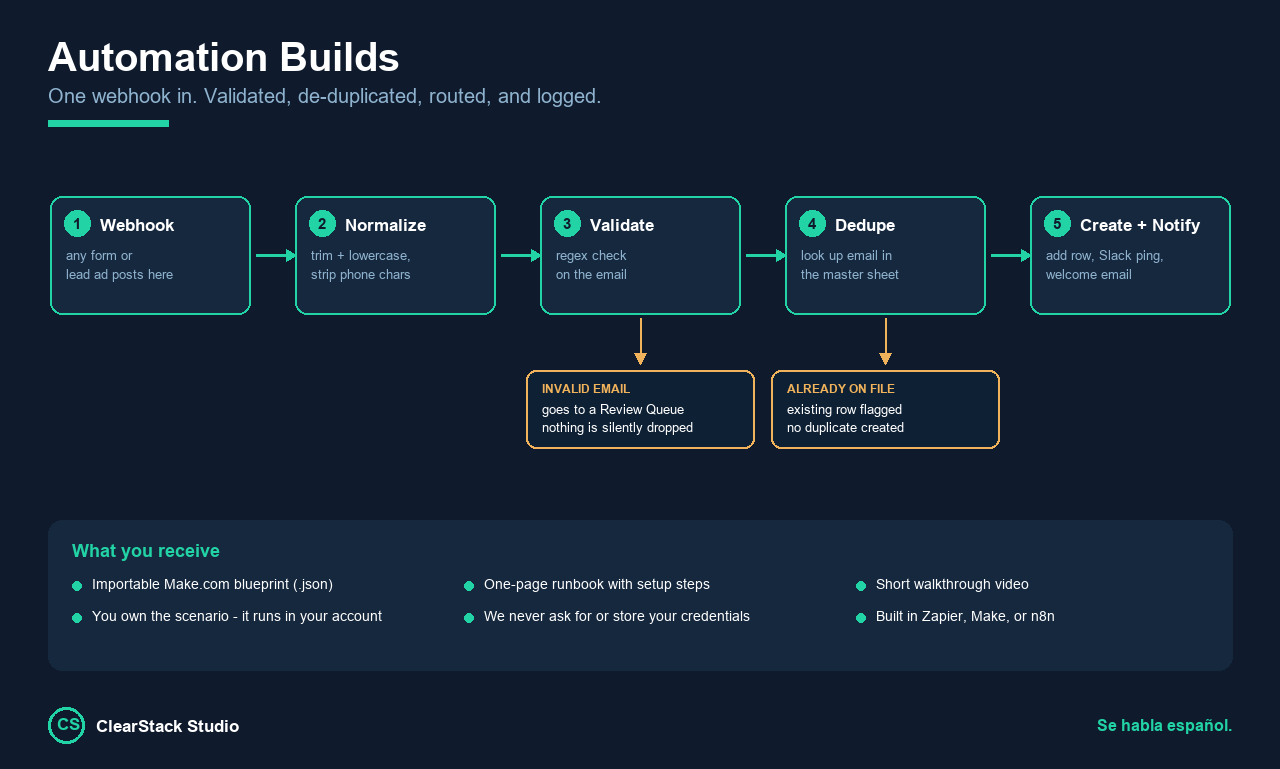
A five-step automation flow: webhook, normalize, validate, dedupe, create and notify, with branches routing invalid emails to a review queue and flagging records already on file.

Automation workflows

from $60

Delivered as an importable blueprint plus a one-page runbook. Invalid records go to a review queue instead of being silently dropped.
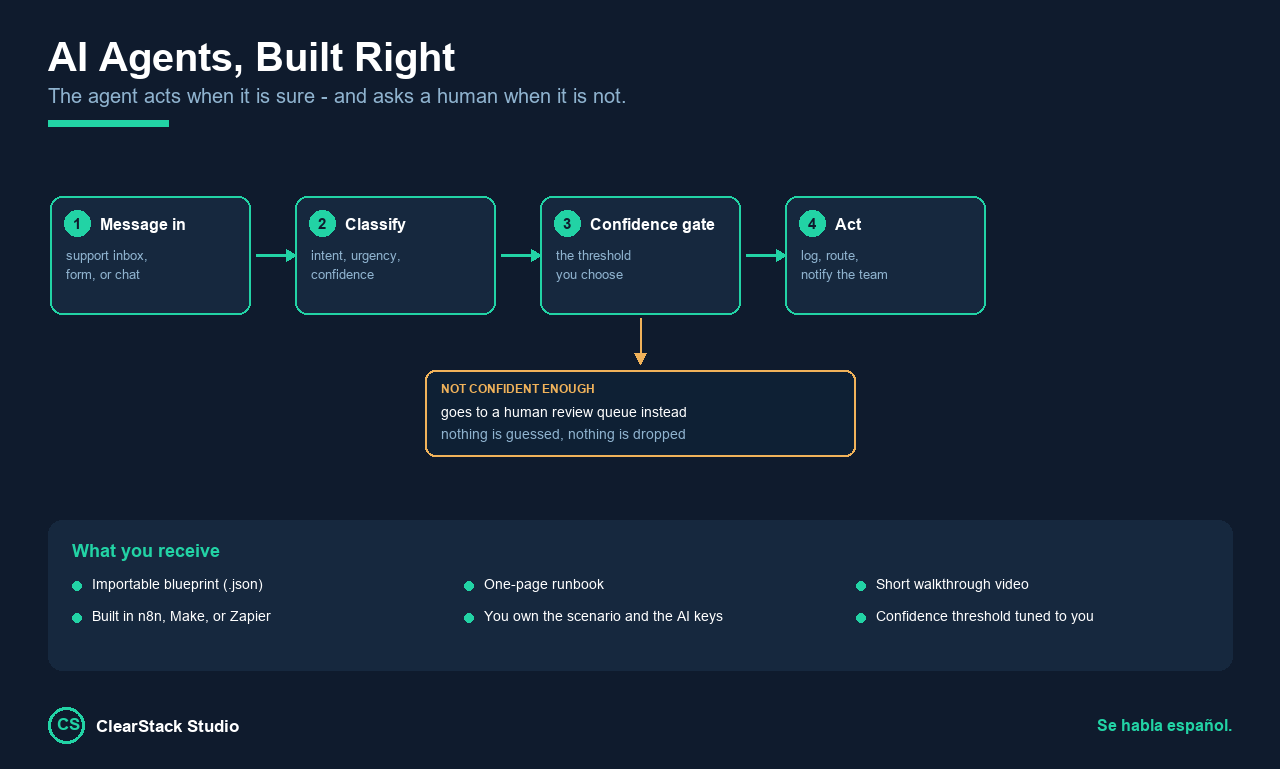
An AI triage agent flow that classifies an incoming message, then routes high-confidence results automatically and low-confidence results to a human review sheet.

AI agents

from $85

Classify, route, summarise or draft — with a confidence threshold in front of anything irreversible.
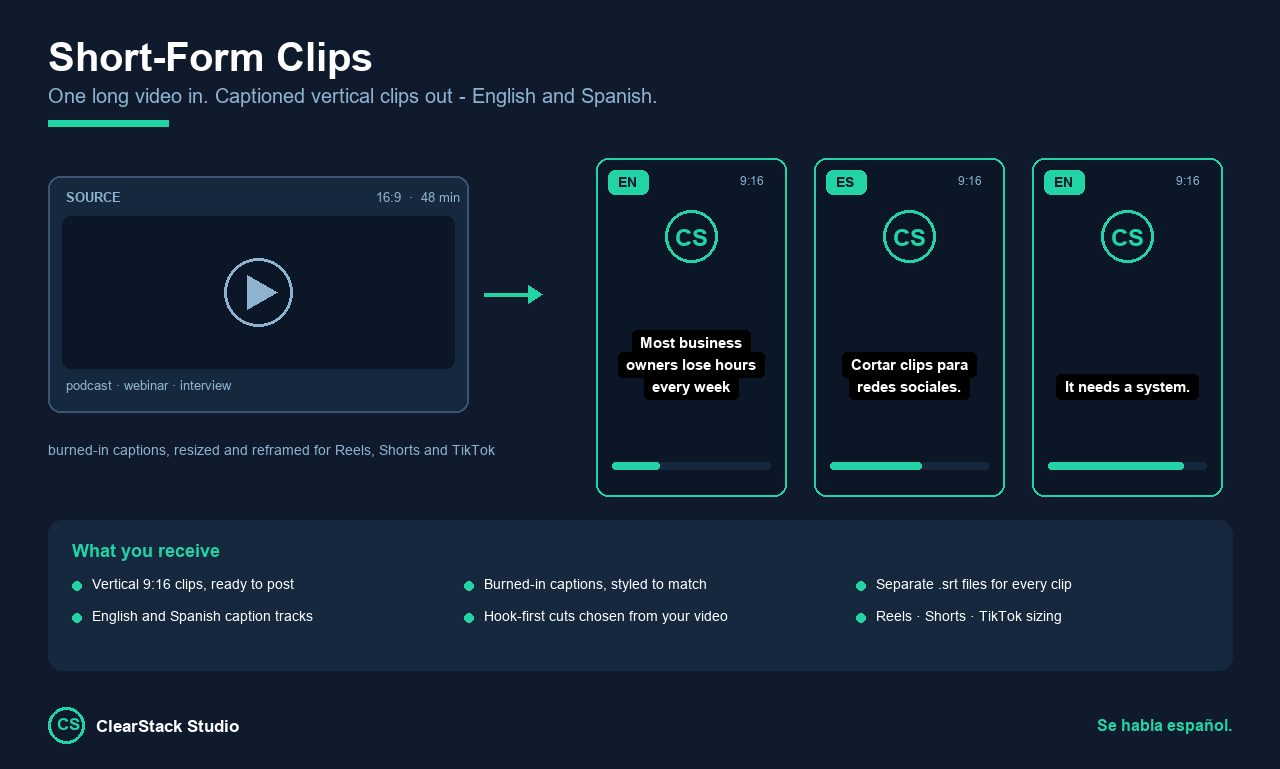
A vertical short-form video clip with burned-in captions, shown alongside its English and Spanish subtitle files.

Short-form video

from $25

Vertical clips cut from your long recording, captions reviewed line by line. Subtitle files included, English or Spanish.

The part most builds skip

When it is not sure, it asks.

Anything the workflow is confident about routes itself and gets logged. Anything it is not confident about goes to a review queue with the original record attached. Blank required fields get flagged, not quietly filled with a guess.

That guard rail is the first thing we put in, not the last. It is what separates a workflow that holds up on messy real-world data from one that only works in the demo.

A confident wrong answer is worse than no answer.

What arrives, and how it works.

Every order includes

  • A working build, tested end to end
  • An importable blueprint file, yours to keep and edit
  • A plain-English runbook covering every connection and setting
  • A short walkthrough video where it helps

How we work

  • It runs in your account, on your connections — so you own it and can change it
  • We never ask for, or store, your passwords or API keys
  • You bring your own AI key where one is needed, and you own that spend at cost
  • Your files are used only to complete your order, then removed

Notes on the boring parts.

What we have learned building this kind of thing, written down properly. No email required.

When the run is green and the answer is wrong

Four failure modes that report success and write bad data. Each one shows the run, the data, and the check that catches it.

What separates an automation that lasts from one that breaks

Six differences between a build that runs for years and one that quietly stops being trusted. None of them are visible in a demo.

Why your automation creates duplicate records

Four causes, the symptom that tells them apart, and the fix for each. Most duplicates are one specific cause that nobody suspects.

When to stop fixing your spreadsheet and build something else

Five signals a spreadsheet has genuinely outgrown itself, three that look like signals but are not, and the middle option most people skip.

Tell us the task you hate.

We will tell you honestly whether it is worth automating — including when the answer is no.

See the gigs on Fiverr →

All four services are listed on Fiverr, where scoping, payment and delivery are handled.